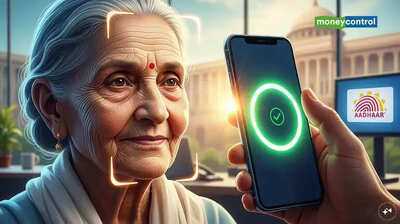
Senior citizens can now submit their Digital Life Certificate (DLC) directly from their smartphones using Aadhaar-based face authentication—an important update that makes the process simpler, faster, and more accessible, especially for pensioners aged 60 to 80. The Employees’ Provident Fund Organisation (EPFO) has rolled out this upgraded system to ensure that pensioners can complete the process from the comfort of their homes. Those who fail to submit the certificate by 30 November 2025 may face a temporary halt in their pension, making timely submission essential.
With Aadhaar-linked digital verification, the need to visit banks or government offices has significantly reduced. Here is a step-by-step guide to help pensioners complete the DLC submission seamlessly through their smartphone.
EPFO’s New Update for PensionersEPFO recently announced that pensioners can generate and submit their Digital Life Certificate using facial recognition technology. This eliminates the need for physical verification and brings convenience to millions of senior citizens. According to EPFO, the process can be completed in just a few minutes using two mobile applications.
Which Apps Are Required?To complete the DLC submission through Aadhaar-based face authentication, pensioners need to install the following two apps:
Jeevan Pramaan Face App
AadhaarFaceRD (Early Access) App
The Aadhaar Face RD app works in the background to verify identity, while the Jeevan Pramaan app facilitates certificate generation.
Step-by-Step Process to Submit Digital Life Certificate 1. Operator AuthenticationBefore starting the DLC process, the pensioner (or operator helping them) must complete a one-time operator authentication.
This includes:
-
Entering Aadhaar number
-
Providing mobile number and email
-
Completing a face scan through the AadhaarFaceRD app
Once this step is verified, the system allows further processing.
2. Enter Pensioner DetailsOpen the Jeevan Pramaan app and enter the following information:
-
Pensioner’s name
-
Aadhaar number
-
Pension type
-
Pension disbursing authority details
An OTP will be sent to the pensioner’s registered mobile number or email. Enter the OTP to move forward.
3. Complete Face AuthenticationThe app will prompt a face scan using the smartphone’s front camera.
For a successful scan:
-
Sit in a well-lit area
-
Hold the phone steady
-
Blink naturally to help the system capture your face accurately
After successful authentication, the system generates the Digital Life Certificate.
4. Download the CertificateOnce the DLC is issued:
-
The pensioner receives an SMS containing a download link for the certificate PDF
-
A Pramaan ID is displayed on the screen for future reference
This certificate is automatically shared with the pension-disbursing authority.
Validity of the Digital Life CertificateThe DLC’s validity depends on the pension disbursing authority, but it typically lasts one year. Pensioners will need to repeat the process once the certificate expires.
Who Can Use Aadhaar Face Authentication?To use this facility, pensioners must have:
-
Aadhaar number linked to their bank/post office/pension authority
-
An Android smartphone with a minimum 5MP front camera
-
A working internet connection
-
A mobile number linked to Aadhaar for OTP verification
While the digital system offers convenience, it also increases the risk of fraud. Several cyber cells have warned pensioners not to share personal details such as Aadhaar number, PPO number, or OTP with unknown callers.
Authorities advise pensioners to:
-
Use only official apps
-
Avoid clicking suspicious links
-
Never share OTP with anyone
If pensioners prefer not to use face authentication, they can still submit their DLC through various modes:
-
India Post’s doorstep service
-
Public sector banks’ doorstep banking
-
Video KYC
-
Biometric fingerprint or iris scan at CSCs or bank branches
This smartphone-based digital submission system is designed to provide elderly pensioners with a convenient, secure, and hassle-free method to verify their life certificate—ensuring uninterrupted pension payments without the need to travel or stand in queues.