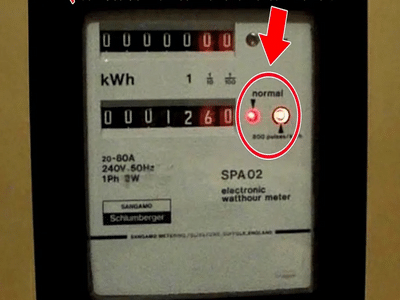
Many households notice a small red light blinking on their digital electricity meter and often assume it signals a fault or unusually high billing. In reality, this tiny indicator is a built-in feature designed to show real-time electricity consumption. Understanding what it means can help you monitor usage, detect issues early, and even reduce your power bill.
What the Blinking Red Light Actually MeansThe flashing red light on a digital electricity meter is commonly known as an impulse indicator. Its job is to measure how much electricity your home is consuming at any given moment. The blinking frequency corresponds directly to energy usage: the faster it blinks, the more electricity is being consumed.
Most meters display a specification such as 3200 imp/kWh or 1600 imp/kWh on their surface. This number indicates how many flashes equal one unit of electricity. For example:
- 3200 imp/kWh → 3200 blinks = 1 unit of electricity consumed
- 1600 imp/kWh → 1600 blinks = 1 unit of electricity consumed
This system allows technicians and engineers to verify meter accuracy and also gives homeowners a visual clue about power usage trends.
Why the Blink Speed ChangesThe speed of the blinking light depends entirely on your home’s electrical load. Heavy appliances draw more power, which increases the blink rate. For instance:
- Running air conditioners, water heaters, or motors → fast blinking
- Using only lights or a fan → slow blinking
- All appliances turned off → light stops blinking or stays steady
So if you suddenly notice the light flashing rapidly, it usually means multiple high-power devices are running simultaneously.
How You Can Use It to Check Appliance ConsumptionThis indicator can be surprisingly useful for diagnosing which appliance consumes the most electricity. Here’s a simple test:
If the light flashes rapidly with just one appliance running, that device may be consuming excessive power and could be inefficient or faulty.
This trick can help you identify old or malfunctioning appliances that may be increasing your electricity bill without you realizing it.
Warning Signs You Shouldn’t IgnoreThe red light usually behaves predictably based on load. However, certain patterns may signal a problem:
- Fast blinking even when everything is off — possible wiring leakage or unauthorized electricity usage
- Irregular blinking patterns — potential meter or wiring fault
- Indicator lights showing “Earth” or “Reverse” signals — wiring or installation issues that should be inspected immediately
If you notice any of these signs, it’s best to contact your electricity provider or a certified electrician rather than attempting to fix the issue yourself.
Other Indicator Lights on Modern MetersDigital meters often include additional LEDs besides the red impulse light. These may indicate:
- Earthing issues — risk of electric shock if grounding is faulty
- Reverse connection — wires connected incorrectly
- Communication signals — used for smart meter data transmission
Each indicator has a specific purpose, so it’s helpful to review your meter’s manual or consult your utility provider to understand what each light represents.
Why This Knowledge MattersMost people ignore their electricity meter until the bill arrives. But learning how to interpret its signals gives you real-time insight into energy usage. This awareness can help you:
- Control monthly electricity costs
- Detect electrical faults early
- Improve appliance efficiency
- Prevent safety hazards
The blinking red light on your electricity meter isn’t a warning sign—it’s a smart monitoring tool. Instead of worrying when you see it flash, use it as a guide to understand your power consumption habits. By paying attention to its speed and pattern, you can make smarter energy decisions, save money, and ensure your home’s electrical system stays safe and efficient.