In today’s fast-paced digital world, messaging apps are all about speed and convenience. WhatsApp has introduced a handy feature that lets users respond to messages instantly using emojis—no typing required. This feature, known as message reactions, helps you communicate emotions quickly while keeping chats neat and engaging.
If you’re new to this feature or want to use it more effectively, here’s a completely refreshed and easy-to-follow guide.
What Does “Reacting to a Message” Mean?Instead of replying with text, you can now attach an emoji directly to a message. Whether it’s a thumbs up for agreement or a heart for appreciation, reactions help you respond in seconds without interrupting the flow of conversation.
How to React to Messages on WhatsAppFollow these simple steps to start using reactions:
Step 1: Open Your ConversationLaunch WhatsApp and go to the chat where the message is located.
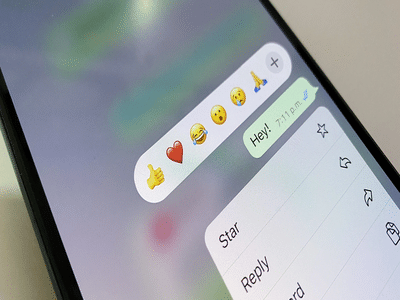
Step 2: Press and Hold the MessageTap and hold the message you want to respond to. A small pop-up will appear with emoji options.
Step 3: Pick Your EmojiSelect from available emojis like 👍 ❤️ 😂 😮 😢 🙏. Tap the one that best matches your response.
Step 4: Reaction Appears InstantlyOnce selected, your emoji will show just below the message and be visible to everyone in the chat.
How to Edit or Remove Your Reaction- Change reaction: Long press again and choose a different emoji
- Remove reaction: Tap the same emoji once more to clear it
- Quick replies: No need to type short responses
- Better expression: Convey emotions clearly with emojis
- Cleaner chats: Avoid unnecessary message clutter
- Engaging conversations: Makes chats more lively and interactive
Message reactions on WhatsApp are designed to make communication faster and more expressive. With just a simple press and tap, you can react to any message instantly.
Whether you want to acknowledge a message, show support, or just add a fun touch, this feature makes everyday chatting smoother and more enjoyable.