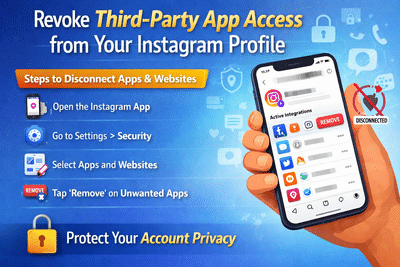
Managing your privacy on Instagram is more important than ever, especially when multiple apps and websites are connected to your account. Many users link third-party services for convenience—such as scheduling posts or logging into platforms—but often forget to remove them later.
Even if you uninstall these apps from your phone, they may still have access to your Instagram data. To keep your account safe and secure, it’s essential to regularly review and disconnect such services.
Why Removing Connected Apps MattersWhen you link an app or website to Instagram, you grant it certain permissions. These can include access to your profile information, posts, or even account activity.
If left unchecked, these connections can:
- Compromise your privacy
- Allow unauthorized access to your data
- Increase the risk of account misuse
- Keep outdated or unused services active
Removing them ensures that only trusted platforms can interact with your account.
How Third-Party Access WorksMany apps use Instagram login to simplify sign-ins or offer additional features. However, once access is granted, the app remains connected until you manually remove it—even if you stop using it.
This is why simply deleting the app from your device is not enough.
Step-by-Step: How to Disconnect Apps and Websites from InstagramFollow these steps to remove unwanted connections:
Once removed, the app will no longer have access to your account.
Check Other Sections for Better ControlInstagram also provides additional tabs to help you manage connections:
- Expired: Apps whose permissions have ended
- Removed: Apps you’ve previously disconnected
Reviewing these sections can give you a complete picture of your account’s access history.
Tips to Keep Your Account SafeTo strengthen your account security:
- Regularly review connected apps and remove unused ones
- Avoid linking unknown or untrusted services
- Enable two-factor authentication for extra protection
- Keep your app updated to access the latest security features
Taking control of third-party access is a simple yet powerful way to protect your digital privacy. By removing unnecessary apps and websites from Instagram, you reduce potential risks and keep your account secure.
Make it a habit to check your connected apps regularly—it only takes a few minutes but can save you from bigger security issues in the future.