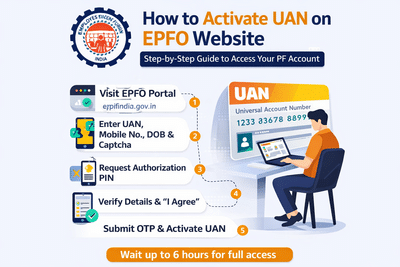
Activating your Universal Account Number (UAN) is the first and most important step to manage your Employees’ Provident Fund (EPF) account online. The Employees’ Provident Fund Organisation (EPFO) provides an easy digital process that allows salaried individuals to activate their UAN and access services like checking PF balance, withdrawals, and account updates.
If you haven’t activated your UAN yet, here’s a complete and easy-to-follow guide to help you get started.
What is UAN and Why is it Important?
The Universal Account Number (UAN) is a unique 12-digit number assigned to every EPF member. It acts as a central identity for multiple PF accounts allotted by different employers during your career.
Once your UAN is activated:
- You can check your PF balance anytime online
- Track contributions made by your employer
- Apply for withdrawals or transfers
- Update KYC details securely
Without activation, you won’t be able to access these online services.
How to Find Your UAN Number
Before activating your account, you need to know your UAN. Here’s how you can find it:
- Salary Slip: Most employers mention the UAN on monthly payslips
- HR/Finance Department: Contact your company if it’s not listed
- EPFO Portal: You can also retrieve it using your registered mobile number and personal details
Step-by-Step Process to Activate UAN Online
Follow these simple steps to activate your UAN through the EPFO official website:
Go to the official EPFO website and locate the “Activate UAN” option on the homepage.
Fill in your UAN, date of birth, registered mobile number, and the captcha code displayed on the screen.
Click on the “Get Authorization PIN” button. You will receive a One-Time Password (OTP) on your registered mobile number.
Enter the OTP received and confirm your details. Tick the declaration checkbox (“I Agree”) to proceed.
Submit the OTP by clicking on “Validate OTP and Activate UAN.” Your UAN will be successfully activated.
What Happens After Activation?
Once your UAN is activated:
- You will receive a password via SMS on your registered mobile number
- You can log in to the EPFO member portal using your UAN and password
- However, you may need to wait up to 6 hours before accessing all services
After this period, you can easily check your PF balance, download passbooks, and manage your account.
Key Tips to Remember
- Ensure your mobile number is active and linked to your UAN
- Double-check personal details to avoid errors during verification
- Keep your login credentials secure
- Complete KYC updates after activation for full access to services
Conclusion
Activating your UAN is a quick and essential process that unlocks full access to your EPF account. With just a few simple steps on the EPFO website, you can take control of your retirement savings and manage your PF details with ease.
If you haven’t activated your UAN yet, it’s recommended to do it at the earliest to avoid any inconvenience and stay updated with your provident fund details.